Enterprise RAG document extraction pipeline
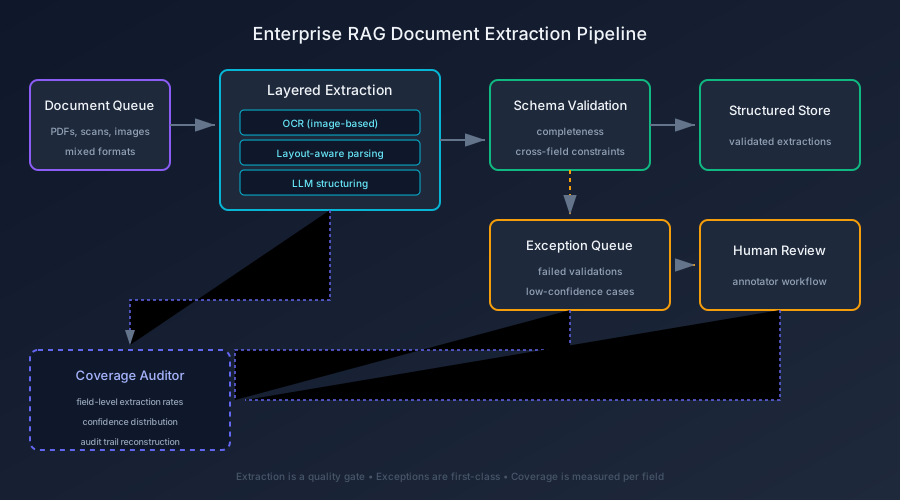
A reference build for high-volume document ingestion: PDFs, scans, and mixed-format files flow through extraction, validation, and exception handling — with coverage audit and human-in-the-loop review for the cases OCR and LLMs cannot resolve.
The problem
Most RAG demos assume clean text: a few markdown files, some API docs, maybe a well-structured PDF. Production RAG faces a different reality: scanned invoices with faded text, multi-column regulatory filings, tables split across pages, handwritten annotations in margins, and documents where half the content is images with no alt text. The extraction layer either succeeds silently (returning garbage) or fails loudly (dropping documents entirely). Both outcomes corrupt the retrieval layer downstream.
The category error is treating extraction as a preprocessing step rather than a quality gate. An enterprise RAG system must answer: which documents were ingested, what fraction of their content was extracted, which fields passed validation, which cases require human review, and what the confidence distribution looks like across the corpus. Without these answers, the retrieval layer is built on sand.
The constraints
This is a reference build, so the constraints mirror production volume and variety: the pipeline must handle PDFs (text and image-based), scanned images (PNG, TIFF), and mixed formats. Extraction must be layered — OCR for images, layout-aware parsing for PDFs, LLM-based structuring for complex fields. Validation must check completeness and consistency without trusting the extractor's self-reported confidence. Exceptions must route to a review queue with context for human annotators. And the entire pipeline must emit coverage metrics and audit evidence — not just a success counter.
The decisions
Five of them, each a rejection of a naive default.
Extraction is a pipeline, not a one-shot call. The build rejects the pattern of "send to LLM, trust the output." Instead, documents flow through stages: format detection, OCR (for image-based content), layout-aware text extraction, field-level structuring via LLM, and validation against schema constraints. Each stage emits metadata about what it extracted and its confidence. This treats document extraction as the production bottleneck rather than a hidden preprocessing step.
Confidence is measured, not self-reported. The LLM's confidence score is meaningless — it's a logit, not a calibration. Instead, the build measures confidence empirically: does the extracted structure match the schema? Do cross-field constraints hold? Does the extracted text align with the source layout? Confidence becomes a composite of structural validation, not a model's self-assessment.
Exceptions are first-class citizens. Documents that fail validation don't get dropped or silently corrected — they route to an exception queue with full context: the source document, partial extractions, validation failures, and suggested corrections. Human reviewers see the original alongside the failed extraction, not a blank form. This is owning the exception queue before the happy path applied to document ingestion.
Coverage is measured per field, not per document. A document isn't "extracted" or "not extracted" — it's a collection of fields with varying extraction quality. The pipeline tracks coverage at the field level: which fields were found, which passed validation, which required review. Aggregate metrics show the distribution: "80% of invoices had line items extracted with >90% confidence; 15% required review; 5% failed entirely."
The audit trail is reconstructable. Every extraction decision is logged: source document hash, extraction method, extracted fields, validation results, reviewer actions. An auditor can replay any document's journey through the pipeline and see exactly what was extracted, why it passed or failed, and who reviewed it. This is the same evidentiary standard as audit trails that answer who acted with what authority.
The outcome
The build answers the three questions an enterprise extraction pipeline must answer and a simple OCR call cannot: what was extracted, how confident are we, and what needs human review. Coverage metrics show field-level extraction quality across the corpus. Exception queues route failures to human reviewers with full context. Audit logs reconstruct every document's journey. And validation gates prevent low-quality extractions from polluting the retrieval layer.
The honest caveat: this is a reference build, not a deployed extraction service with production traffic. There are no throughput numbers or cost-per-document metrics to show, because the point of the build is the architecture — that extraction is a quality gate, not a preprocessing step — not a benchmark. A benchmark would tell you it's fast; the pattern tells you whether it can be trusted when documents are messy, varied, and high-stakes.
Reference implementation
The pattern is instantiated as a runnable Python reference implementation — a document extraction pipeline with layered extraction (OCR + layout-aware parsing + LLM structuring), schema validation, exception queueing, and coverage auditing. The pipeline ingests PDFs and images, extracts text and structure, validates against a schema, routes exceptions to a review queue, and emits coverage metrics.
The implementation includes a synthetic corpus of 50 documents (invoices, regulatory filings, contracts) with varying quality: clean PDFs, scanned images, multi-column layouts, tables, and handwritten annotations. Five self-checking scenarios demonstrate: normal extraction, partial extraction with exceptions, low-confidence routing, human review workflow, and coverage audit reporting.
The full source — pipeline, validators, exception queue, coverage auditor, and synthetic corpus — is public at github.com/Dhristhi/rag-document-extraction, under the Apache-2.0 license.
What you can run
git clone https://github.com/Dhristhi/rag-document-extraction
cd rag-document-extraction
uv sync --extra dev
uv run pytest -q
uv run python -m extraction_pipeline.demo
for s in scripts/scenario_*.py; do uv run python "$s"; done